Pipeline order
Inside renderImage the steps run in this fixed order. Each is optional except where noted; omitting an option means "no-op for that step."
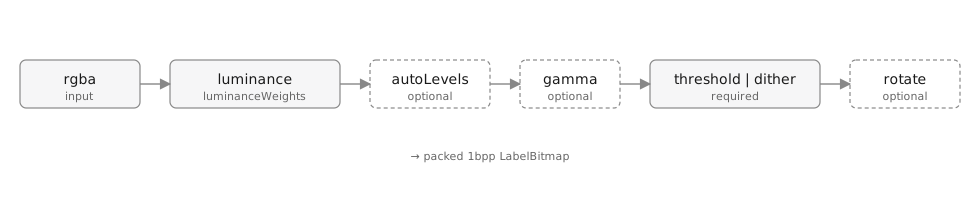
rgba → luminance(weights) → autoLevels → gamma → threshold | dither → rotateWhy this order
Each step assumes the buffer it receives is in the right shape. The order is load-bearing — re-ordering would change observable output and several edge-case behaviours.
luminance runs first
Everything downstream operates on a single greyscale value per pixel, not RGBA. Without this step, autoLevels and gamma wouldn't have a tone signal to work with.
luminanceWeights selects the RGB → grey collapse:
'bt709'(default) — modern HDTV weights,[0.2126, 0.7152, 0.0722]'bt601'— legacy NTSC weights,[0.299, 0.587, 0.114]- custom tuple — read a single channel, e.g.
[1, 0, 0]for red-only
Alpha is composited against pure white at this stage too, so partially-transparent input pixels never ghost into ink. See Tone & luminance.
autoLevels runs before gamma
autoLevels rescales the input range so the darkest pixel becomes 0 and the brightest becomes 1 — restoring contrast in low-contrast scans.
gamma is a midtone-shaping curve that assumes a full-range input. Running gamma on an [80, 160]-range buffer would barely move anything; running it after autoLevels lets the curve do real work.
This order also matches the convention of every photo-editing tool: levels first, curves after.
gamma runs before threshold/dither
Both threshold and dither make their decisions based on luminance values. gamma is the last point at which we can shift midtones — once the buffer is binarised, the only thing left is whole-pixel inversion (invert).
threshold or dither, never both
These are mutually exclusive: a hard threshold quantises every pixel against a single value, while a dither method has its own quantisation logic baked in. If dither is set (to anything other than false), threshold is ignored.
dither: true is a v1.0 alias for dither: 'floyd-steinberg' — kept for backward compatibility; new code should pass the string.
rotate runs last
Rotation is applied to the 1bpp output, not the source RGBA buffer. Two reasons:
- Cheaper. The 1bpp buffer is 32× smaller than the RGBA buffer; rotating it is a small constant.
- Deterministic. Rotating before quantisation would couple the dither pattern to the orientation. Rotating after means a rotated label and an unrotated one share identical quantisation decisions per pixel — the rotated one is just the unrotated one read in a different order.
For 90° and 270° rotations, widthPx and heightPx swap; for 180° they stay the same.
What invert actually does
invert: true swaps black and white in the final output bitmap — it doesn't move within the pipeline because it has no input to operate on (luminance is between 0 and 1; "inverted luminance" is just 1 - L, which is a no-op when followed by symmetric quantisation).
Implementation detail: trailing bits in the last byte of each row stay zero after inversion, preserving the LabelBitmap invariant that unused bits are always 0.
Multi-plane variant
renderMultiPlaneImage runs almost the same pipeline, but per-plane:
rgba → classify → for each palette entry P:
                    (luminance_P + mask_P)
                  → autoLevels_P → gamma_P
                  → threshold | dither (mask-aware)
                  → rotate
                  → LabelBitmap_P
The classify step routes each pixel to one palette entry (or the implicit white background), and per-plane error-diffusion dither is masked so error never crosses plane boundaries — preserving the mutual-exclusivity guarantee. See Multi-plane output.