Multi-plane output
Some thermal printers can place more than one ink/foil colour on a label — e.g. a Brother QL-800 with DK-22251 red/black tape, or two-colour DYMO/Zebra models. renderMultiPlaneImage accepts a caller-supplied palette of N entries and returns one independent 1bpp LabelBitmap per palette entry, keyed by entry name.
Output planes are guaranteed mutually exclusive: at every pixel position, at most one plane has its bit set, because most multi-colour thermal heads cannot fire two colours on the same dot.
import { renderMultiPlaneImage } from '@mbtech-nl/bitmap';

// Brother QL-800 with DK-22251 red/black tape.
const { black, red } = renderMultiPlaneImage(image, {
  palette: [
    { name: 'black', rgb: [0, 0, 0] },
    { name: 'red', rgb: [204, 0, 0] },
  ],
  defaults: { dither: 'floyd-steinberg' },
  planes: {
    // Red foil prints a touch lighter on this printer — calibrate.
    red: { gamma: 1.15 },
  },
  rotate: 90,
});

// `black` and `red` are independent LabelBitmaps. Driver-side, they go
// into the printer's two-colour wire format (this package doesn't do
// hardware-specific framing).
Worked example
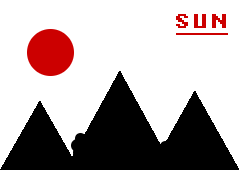
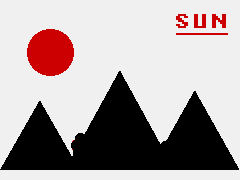
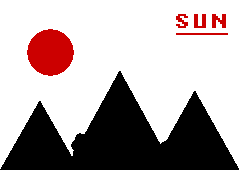
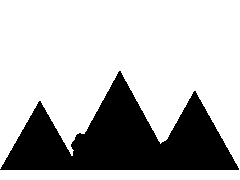
Here's the same red+black palette applied to a designed source image. The classification map shows which plane each source pixel was routed to; the per-plane PNGs are how each plane would print on white paper; the composite combines both.
How classification works
Each source pixel is classified to exactly one palette entry, or to the implicit white substrate background. Classification picks the closest palette colour by Euclidean distance in RGB (default) or CIELAB ΔE76 (colorSpace: 'lab'). Pixels closer to white than to any palette entry land on the implicit background and produce no ink in any plane.
For each classified pixel, an intensity in [0, 1] is computed from how close the pixel sits to its assigned palette colour relative to that entry's Voronoi half-width (the half-distance to its nearest other palette entry, including white). Pure palette colour → intensity 1.0 → maximum ink density. Boundary pixels → intensity ~0.0 → no ink. Anti-aliased edges therefore fade out naturally toward the boundary.
This means intensity measures colour-closeness, not darkness. The classifier is well-suited to designed assets, line art, anti-aliased text, and logos. For photo-like input with dark off-palette colours, the resulting plane will look weak — pre-process with a colour-quantisation step first.
Per-plane options
MultiPlaneRenderOptions.defaults applies to every plane unless overridden in planes[name]. Per-plane override fields:
| Field | Same meaning as in renderImage? |
|---|---|
threshold | Yes |
dither | Yes |
autoLevels | Yes (per plane; see note below) |
gamma | Yes |
Notably, invert is not available on PlaneRenderOptions. Inverting an individual plane would set bits on every background and other-plane pixel, breaking the mutual-exclusivity guarantee. If you need an inverted plane, call invertBitmap(planes.foo) on the result.
autoLevels per plane runs over the plane's full buffer; because background pixels are pinned to luminance 1.0, only the foreground's min drives the stretch. Net effect: each plane stretches its foreground to use the full [0, 1] range relative to its own substrate-white reference.
rotate is a top-level option (not per-plane) — independent rotation makes no physical sense for a multi-colour print.
Choosing colorSpace
'rgb'(default) — fast Euclidean argmin in 0–255 RGB. Fine for designed assets where palette colours are clearly separated.'lab'— convert sRGB → linear → XYZ → CIELAB (D65 white) and pick by ΔE76. Use when palette colours are perceptually close (e.g. two near-identical reds) and you need the visually-correct partition.
For typical two-colour printers (red+black, blue+black, gold+black) RGB is fine. For three+ colour palettes with similar hues, switch to 'lab'.
When the choice doesn't matter — well-separated palette
With a separated palette like [red, green, blue], RGB and Lab partition the source image identically — every pixel ends up in the same plane either way. There's no reason to pay Lab's small overhead.



When the choice matters — perceptually-close palette
The grid below uses a deliberately adversarial palette: a crimson [200, 30, 40] and a scarlet [220, 60, 20] that sit close in RGB space, plus a blue. The boundary between crimson and scarlet shifts between RGB Euclidean and CIELAB ΔE76 — pixels near the boundary land in different planes depending on which metric you pick. This is exactly the case colorSpace: 'lab' exists for.







The blue plane is identical in both runs — blue is far from both reds in either metric. The crimson and scarlet planes differ near the boundary between the two red circles.
Validation
renderMultiPlaneImage throws RangeError on:
- empty palette, or > 254 entries
- duplicate plane names, or duplicate
rgbtuples - name
'white'(reserved for the implicit background) rgboutside[0, 255]or non-integerrgbexactly[255, 255, 255](collides with implicit white)- zero-dimension image, or
data.lengthmismatch